Promote Podcast

Tuesday, November 16, 2010

Virtual Studio

Most news/sport studios are hand crafted from the ground up, like Fox News and ESPN and Comcast Sportsnet. They leave the fancy graphics to the intros outros and transitional elements.

But shows with little or no budget like Tosh.0 and Talk Soup, the hosts are normally on a green screen and the designer pretty much can put whatever they want behind them.

In our case, we obviously don't have the money to spend on a fancy-schmancy studio desk and background, so we have to do everything digitally.

I started by looking at other news centers and see what they have in common, it's mostly steel/industrial with some shiny metallics and illuminating lights thrown in for good measure. And along with some kind of LCD array in which to "show-off" their broadcast center in the background and whatnot.

Being as Fusion is not the center of the Dance Radio broadcast world (not yet), we need to start of small. A backdrop depicting some metallic structure, a window to view Chicago's beautiful skyline and a virtual TV to show media as the DJ announces it.

I started out with the base stage with some basic geometry:


Then I built the window and the viewport for the TV:


And many hours later, some lighting and texturing, and some floor mechanics, and we currently have this:


I'm certainly not done yet, I need feedback from the Fusion folks on the general motif, what they like/don't like, and what they would like to see, etc.

Plus this was designed like the DJ would be standing, but if he is sitting or behind a desk that they might get, I will need to redesign the stage to reflect the phyiscal hardware and the perspective of the stage.

Anyways, I like the way this is going and time will tell how this eventually turns out.

Interesting appraise

I was talking with the marketing director of Fusion Radio last night, and we were discussing an upcoming Top 20 countdown that he wants me to work with someone from Canada on doing a graphic intro. And he mentioned that he was able to discuss their "live" videos with someone from Fox News Chicago who was the director of media over there, and he showed the guy from Fox some of my work and he said that they were really good! How about that, some good appraise from someone high up in the industry, wow!

In addition to that, he was also saying that our "live" videos need more movement in the background instead of just the static Fusion logo. So, I came up with the idea of a News Anchor-ish background for the DJ to stand in front of, there would of course be the Chicago skyline in the background, and some architecture around a window and a virtual TV in which to show media on.

So, a virtual news studio, a Top 20 countdown intro animation, and some videos to render for next week.

Busy busy busy!

Friday, November 12, 2010

Logo Redesign

After about a year trying to find that elusive logo design that accurately represents Angler.digital, I think I may have found it. Although I'm still contemplating how to bring the fish into the animation, I think I have a great start.

Monday, November 8, 2010

New Show reel

FX Reel - 11/05/2010 from Dave Spooner on Vimeo.

New show reel for this year, a compilation of things I have worked on so far in 2010. There's more motion graphics this time than visual effects, which is a first. And I was able to fill up a reel with work done only in this year, which is also a first. This year has also marked the conclusion of a great trilogy and a film that won 2 awards which is showcased in my VFX Breakdowns part of the video.


It's not the end of the year yet, but it might as well be. November and December months I don't normally have a lot of free time, mostly spending it with family and whatnot. But its a great time to sit back and relax.

The biggest change to this year's reel is the separation of Visual Effects and Motion Graphics, and I decided to show breakdowns of visual effects. Sometimes the art is lost if the viewer doesn't realize the blank canvas that you started with, and sometimes a new appreciation can be discovered.

I remember how this passion all started for me, it was The Mummy (1999) that really opened my eyes. Before I even saw the movie for the first time, they showed a behind the scenes feature one night and the showed the breakdown of the scene where the mummy was gaining his powers after he'd just consumed the blind guy, and Brendan Frasier started shooting at him causing bits and pieces to tear off. I was hooked!

Thursday, October 28, 2010

The Art of the Explosion, Part 1

Michael Bay may not be known for his direction or storytelling, but he is definately known for creating spectacular explosive visuals. I have been attempting creating explosions for about 2 years now, and while they have all been space atmosphere explosions (which simplifies things immensely), they still require a lot of finese to create, control, and visualize.

In the 3D animation world, even to this day, 3D generated explosions using volumetric shaders or real-world physics-driven simulations still don't look realistic enough. While they have gotten pretty good on the physical aspect of the explosion (movement, reaction to gravity/wind/object) it's usually the look or the feel that gives it away.

So, how do big-house productions use/create explosions?

Well, the easy route would be to take pre-keyed (a keyed element is a video that has an alpha channel for a background, therefore being transparent making compositioning MUCH easier) video of an explosion and layering onto our video. Movies like Independence Day and Starship Troopers and many other movies in the 90's used this method. The problem with this method is that it's usually VERY hard to find the explosion you are looking for. Maybe the fire needs to react with other elements in the scene and finding one that looks and reacts just right can be very time consuming.

The other route that most big productions seem to be taking is the create-your-own-explosions route. This method provides wonderful advantages in moulding and shaping EXACTLY the way you want the explosion to happen. Even making things happen that would not even occur in real-world physics, or creating physics for something that has yet to be seen (space physics for example). Contrary to popular belief, fire DOES BURN in space, but it burns MUCH faster hence the lack of oxygen. Howeven if there is fuel, then the quicker-disbursed fumes will burn very quickly. Same with smoke, however it even dissipates much faster than fire in space, probably not even noticeable to the naked eye depending on the size of the explosion. Event Horizon was a good movie that delved into more real-world phsyics of space explosions. But the norm for Hollywood is to create atmospherically correct explosions, even in space for the simple reason that it just looks better.

The trick that Hollywood represents, is that it really doesn't matter if the explosion is realistic for the environment so long as it fits and enhances the scene.

How do you create an explosion?

The first thing to do is to be aware of your environment. In my case I've been building explosions in space. So definately lack of gravity will be needed, however I still use huge, long-lasting plumes of fire and smoke, totally out of place in space, however it looks really good and helps me drive the story (and hide the fact that there is really no physical damage). It's easier to notice an bad explosion if it dissipates and there's no visible damage than a physically incorrect but good-looking explosion. In the Atmosphere you have to consider gravity, wind, friction, and collisions.

There are two different types of volumetric effects programs out there; there's volumetric shaders (more used for big plume explosions like buildings and aircraft) and volumetric simulators (more used for fire and small, locallized, explosive bursts like car-bombs and hallways).
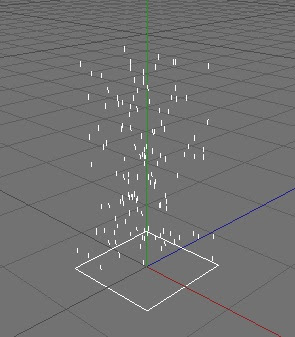
I have more experience with Volumetric shaders with particles, because they have fit my needs more than the other programs. In most 3D programs you can create simple particle emitters that throw out a preset amount of particles in a single direction with some variation, as you can see in the picture:

This will provide some particles in which a shader could be attached for some fire texture. However, this will look extremely bubbly and very unrealistic, like a pre-schooler drawing comparing to Da Vinci.

These are randomly placed particles coming out at a random speed with simplistic direction. No. What we need is chaos!


And we need to control that chaos.
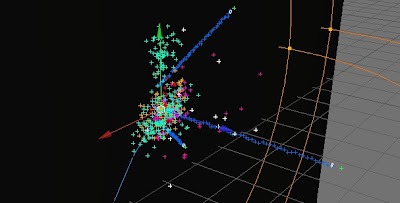
Imagine an explosion. We have the impact, the initial plume, an expanding plume, a directional plume, random plume offspring, small fireball debris, and pieces debris. Taking these items into account and designing particle systems for each piece of the explosion takes a lot of time, and in the end the particles will look something like this:

Here we have all systems in place to control the randomocity and chaos of an explosion. This is a space explosion, so we lack gravity, wind and friction. Those will have to taken into account in an atmosphere explosion. (each color represent a different control system)

To control this explosion we have to setup a system of rules and checks to monitor conditions for all systems.


In the simple particle emitter, there is nothing in place to control this. However to build a complete explosion we need to slowly introduce each element and make sure it's functional before moving on to the next piece. After a while (4 days for me) of tinkering and tweaking the particles, there could be a system that looks like this:
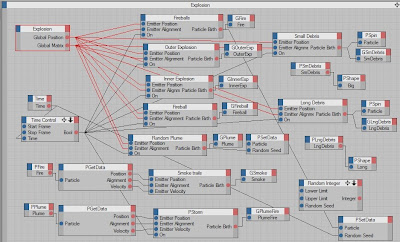


Compared to big house productions that do HUGE calculations for dynamic realistic explosions on a daily basis, this is a kids toy, VERY simple. But, for me, it's a start. And you always have to start before you can finish. However building your own explosions in 3D is like playing golf; you never win but you get better and better :). And taking this simple explosion system and adding volumetric lights you get something that looks like this:

Certainly not bad for 4 days of playing around. My lighting is still too bright, and there is some more tinkering to be done with the pieces and plumes, but it's a good start. I plan on improving this continuously and eventually replacing the explosion elements in my recent space battle scene with these once I get them looking good enough and reacting well to my environment.

I also need to develop the delivery and impact system, so that I don't have to animate each explosion. I could do a simple Star Trek proton torpedo type of effect, very simple, easy and cool looking to do. But I'm not sure where I want to go with this, I want to do something unique, so I may play off of the proton torpedo look, or I may do something different.

Tuesday, October 26, 2010

More space, more explosions, more ships!

In learning Cinema 4D it was inevitable that I create a space combat animation. This seems to be something I have a knack for, and no matter what I am working on I always find ideas to use in my "next" space animation.

This one is a combination of many different things that I have created over the years. My biggest accomplishment in this video is the Earth which was completely modeled by me. The next big thing is the big ship, which was the 9th iteration of the vessel in a backburner short-film PEARL. The small ships are a simple model I made last week.

Lots of different programs were used as well, many different layers of animation, background, lighting, and general compositing. 3DS Max, Cinema 4D, After Effects, Soundbooth and Premiere were all used in creating this animation. This video was made in about a week which is pretty good considering my last animations several years ago.

It's still not perfect, I didn't like the sun, and some of the compositing and sounds were sloppy, but I just wanted to move on, I've learned what I wanted to learn with this animation.

Cinema 4D Space Battle test from Dave Spooner on Vimeo.

Monday, October 25, 2010

I'm a blur, I'm a blur!

Flurry of activity over the past few days. I first created a redesign of the Fusion Radio logo, I was trying to imitate the new Comcast Sportsnet design style along with a heavily textured and detailed "F" logo. I think it turned out quite well and I'm still waiting for a response from the Fusion guys about it.

I also felt that I was getting a little stagnant in my 3D animation so I decided to create another space battle using Cinema 4D instead of old reliable (3DS Max), along with After Effects for compositing the 3D layers and special effects.

My previous space battle I created was almost 3 years ago. It was made almost entirely in 3DS Max with Afterburn for explosions and old models that I had created for PEARL (a now defunct short film that never saw light of day). Now, I used a ship model that I redesigned for PEARL a year ago and another smaller ship design that I made just recently. And using After Effects to composite all special effects like explosions, film grain, and other artifacts, and then using Premiere to finish it all together.

It's turning out quite nice. And because Cinema 4D has much easier controls to bring 3D data into After Effects, the compositing side is going pretty fast. The hardest part so far was converting the old ship model from 3DS Max into something Cinema 4D could use.

I plan on posting it as soon as it's done as it will be the most complete 3D rendering of any kind I have ever done. A complete story from start to finish. I never finished my older renders becauce while Afterburn is totally awesome, it takes forever to render! I started the new animation on Friday, and I'm putting together the final scene now. But I am having other issues with adding debris layers, but I'm thinking about just leaving those out, we'll see.

There's also been a lot of activity with the Screen Writer's guild that was responsible for the production of Orbit Control, but so far there hasn't been any real solid movement towards another film, but I guess as long as there's activity then things will keep moving forward.